How to Use Instagram Keyword Triggers to Deliver Lead Magnets
CreatorGati Team
Instagram Growth Experts
If you've ever posted "DM me for the link" and then spent the next hour copying and pasting the same URL to 50 different people, you already know why automation matters.
That hour? You could've been creating content. Or running your business. Or, honestly, doing literally anything else.
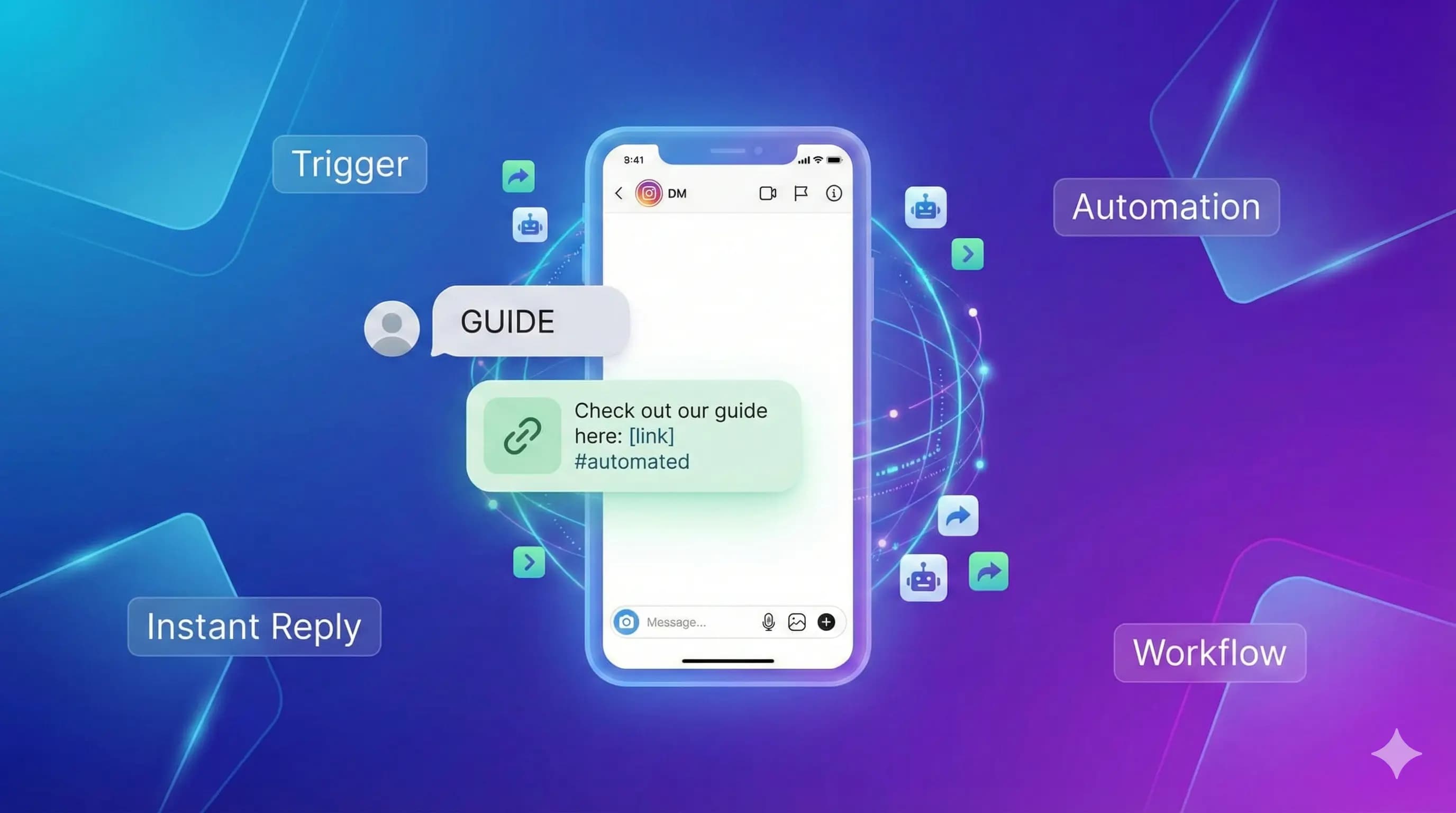
Keyword triggers fix this. Someone DMs you a specific word, they automatically get your link. No copy-pasting. No checking your phone constantly. It just works.
How keyword triggers actually work
The concept is dead simple.
You pick a word-let's say "GUIDE". Whenever someone sends you a DM containing that word, your automation fires off a pre-written response with whatever you want to share.
That's it. No complicated flows. No multi-step sequences (unless you want them). Just: keyword in, response out.
The person asking gets instant gratification. You get your time back.
Picking the right keywords
This seems obvious but people mess it up constantly.
Good keywords are:
- Short (one word ideally)
- Easy to spell
- Memorable
- Unique enough that people won't trigger it accidentally
"GUIDE" works. "TEMPLATE" works. "START" works.
"I would like to receive the free guide please" does not work. Nobody's going to type that.
"Help" is risky-people say "help" in all kinds of contexts. You'll get false positives.
My recommendation: use all caps for your keyword in your content. "DM me GUIDE for the link." Makes it crystal clear what to type.
Writing the response message
Your automated response is doing one job: delivering what the person asked for while not sounding like a robot.
Keep it short. Keep it friendly. Include the link.
Something like:
"Here's that guide you asked for: [LINK]
Hope it helps! Let me know if you have any questions."
That's literally all you need. Don't overthink it.
What you definitely shouldn't do: write a novel. Nobody wants to receive a five-paragraph essay when they just asked for a link.
Setting it up
The actual technical setup takes maybe two minutes. Here's the process:
- Create an automation and name it something you'll remember
- Enter your trigger keyword
- Write your response message with the link
- Save it
- Test it from another account
That last step matters. Actually DM yourself from a different account to make sure it works. Nothing's more embarrassing than promoting your automation and having it fail.
Getting people to trigger it
You've built the automation. Now you need people to actually use it.
The most effective approach: create content specifically designed to drive keyword triggers.
A Reel that ends with "DM me GUIDE for the free cheat sheet" works way better than just putting it in your bio. You're catching people when they're engaged, not asking them to remember later.
Stories work great too. "Reply to this story with GUIDE and I'll send the link." Instagram even has DM stickers that make this easier.
The key is being specific about the keyword. Don't say "DM me for the guide"-people will type all kinds of random stuff. Say "DM me the word GUIDE" so they know exactly what to send.
Why this beats link-in-bio
Everyone tries the "link in bio" approach first. And it kinda works. But not great.
Here's the problem: someone watches your Reel, gets interested, and then has to navigate to your profile, find your bio, click the link, probably go through a Linktree or similar, find the right link...
That's a lot of steps. People drop off at every single one.
With keyword triggers, the path is: "DM GUIDE", receive link, click. Three steps. Way less friction.
Plus, now you have an open DM conversation with them. That's valuable for building relationships and potentially selling something later.
After the initial automation
Once the basic trigger is working, you can get fancier if you want.
Add a follow-up question to your response:
"Here's the guide: [LINK]
Quick question-are you just getting started or have you been at this for a while?"
Now you've opened a conversation and learned something about them. That info is useful if you sell coaching or have multiple products.
But honestly? Start simple. Get the basic trigger working first. Add complexity later based on what you actually need.
The time math
Let's be real about what this saves you.
If you get 20 requests a day and each one takes 30 seconds to handle manually, that's 10 minutes daily. Maybe not a huge deal.
But if you get 100 requests? That's almost an hour. Every day. And it's not even an hour of focused work-it's constant interruptions throughout the day.
Automation handles all of that in the background while you do other things. Set it up once, it runs forever.
That's the actual value here. Not just the time saved, but the mental space freed up from not having to constantly monitor your DMs.